
TikTok Profile Pictures: Ideas, Size Guide and Tips That Get You Followed
Your TikTok profile picture is the tiny circle that follows you everywhere on the app. It sits next to every video on the For You page, every comment you leave and every message you send. It's often the very first thing people notice before deciding whether to tap your profile.
In this guide, we'll cover the right TikTok profile picture size, how to change it, creative TikTok profile pictures ideas for every type of account, and the common mistakes that quietly cost you followers.
Why Your TikTok Profile Picture Matters
On TikTok, people make decisions fast. When a viewer enjoys your video, they usually glance at your profile picture and username before tapping Follow. A clear, memorable image makes that decision easy.
A good TikTok profile picture helps you:
- Get recognised in comments, so regular viewers spot you instantly.
- Build trust, especially if you're a business or creator selling something.
- Stay consistent with your Instagram, YouTube and other platforms.
- Turn viewers into followers, because a polished profile looks worth following.
Think of it as your logo. Even personal accounts benefit from treating it with a little care.
TikTok Profile Picture Size and Requirements
TikTok profile pictures display as a small circle, so getting the size and framing right matters.
| Detail | Recommendation |
|---|---|
| Minimum size | 200 x 200 pixels |
| Ideal size | 400 x 400 to 1080 x 1080 pixels |
| Aspect ratio | 1:1 (square) |
| Display shape | Circle (corners are cropped) |
| File types | JPG or PNG |
| Best focus | Face or logo in the centre |
Pro tip: because the corners get cropped into a circle, keep anything important in the middle third of the image. Text near the edges will almost always be cut off.
How to Change Your TikTok Profile Picture
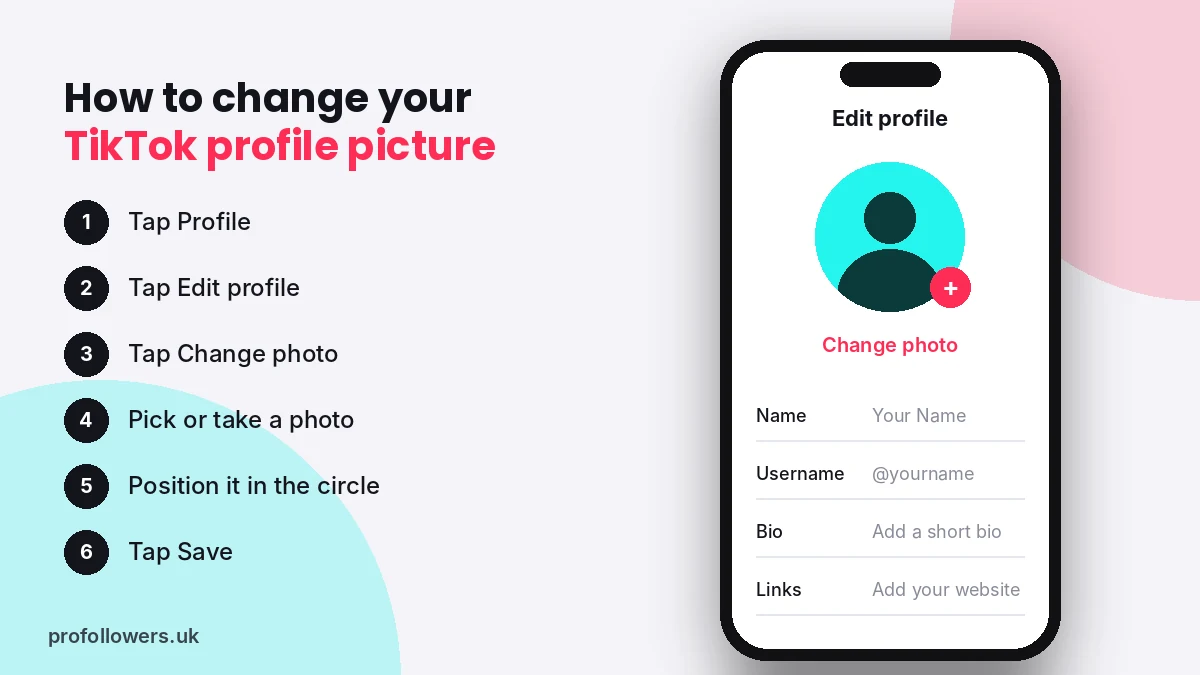
Updating your picture only takes a minute:
- Open TikTok and tap Profile in the bottom right corner.
- Tap Edit profile.
- Tap Change photo at the top.
- Choose Take photo or Select from gallery.
- Drag and zoom to position your image inside the circle.
- Tap Save to confirm.
If your new picture doesn't appear straight away, close and reopen the app. It can take a few minutes to update across TikTok.
TikTok Profile Pictures Ideas for Every Type of Account
There's no single "best" TikTok profile picture. The right choice depends on who you are and what your account is about. Here are ideas that work well for different creators.
For Personal Accounts and Creators
- A close-up headshot: shoulders up, smiling, with good natural light. Simple and always effective.
- A candid action shot: you mid-laugh, mid-dance or doing your hobby.
- A bold background colour: a plain bright wall makes your face pop in that small circle.
- A matching aesthetic: if your feed has a vibe, such as soft pastels or moody film tones, match it.
For Businesses and Brands
- Your logo: centred, with enough padding so it isn't cropped.
- A logo on a brand colour background: easier to spot than a logo on white.
- The founder's face: works brilliantly for personal brands and small businesses.
- Your hero product: great for single-product shops.
For Niche and Theme Accounts
- Gaming accounts: an avatar, character-style illustration or your gaming setup.
- Pet accounts: a close-up of your pet's face, ideally looking at the camera.
- Food accounts: a colourful signature dish shot from above.
- Fitness accounts: an energetic shot in your training kit.
- Aesthetic accounts: a simple object, cartoon or illustration that sums up your style.
Cute and Funny TikTok Profile Pictures
Not every account needs to be serious. Cartoon versions of yourself, playful illustrations, cartoon animals and meme-style pictures can all make your profile feel fun and approachable. Just make sure you have the right to use any artwork. Using copyrighted characters or someone else's photo can get flagged, and it doesn't help people recognise you.
Profile Picture Styles Compared
| Style | Best for | Pros | Cons |
|---|---|---|---|
| Headshot | Creators, coaches, influencers | Builds trust and personal connection | Needs good lighting |
| Logo | Brands and businesses | Instant brand recognition | Can feel less personal |
| Illustration or avatar | Gamers, artists, anonymous creators | Unique and memorable | Less personal than a photo |
| Pet or object | Niche and theme accounts | Fun and on-topic | Harder to build a personal brand |
| Product shot | Online shops | Shows what you sell | Can look like an advert |
Tips for Taking a Great TikTok Profile Picture
You don't need a professional camera. Your phone is more than enough if you follow a few basics:
- Use natural light. Face a window rather than having it behind you.
- Keep the background simple. Busy backgrounds disappear into a blur at small sizes.
- Fill the frame. Your face should take up most of the circle.
- Use contrast. A light face on a darker background, or the reverse, stands out best.
- Keep it sharp. Blurry or pixelated images look unprofessional.
- Match your other platforms. Using the same picture on TikTok and Instagram makes you easier to find.
Common TikTok Profile Picture Mistakes to Avoid
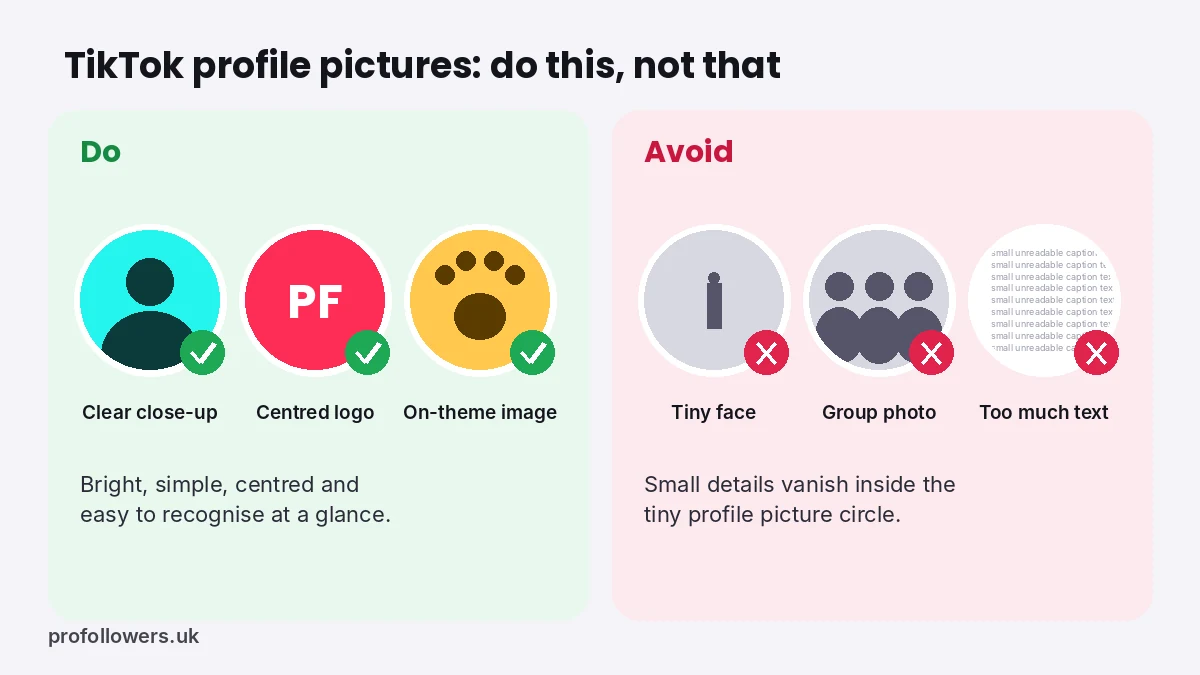
- Group photos: viewers can't tell which person you are.
- Tiny faces: a full-body shot turns into a dot in the circle.
- Text-heavy images: small text is unreadable at profile picture size.
- Changing it too often: regular viewers lose track of you.
- Low-quality screenshots: they look careless and lower trust.
- Leaving the default avatar: an empty grey icon can make your account look inactive or fake.
Your Profile Picture Is Only Part of the Picture
A great profile picture gets people to tap, but your whole profile decides whether they follow. When someone lands on your page, they also look at your bio, your video thumbnails and, of course, your follower count.
Here's a quick checklist for a profile that converts:
- A clear, recognisable profile picture
- A short bio explaining what you post and why people should follow
- A link in bio if you have a shop or website
- Pinned videos showing your best content
- Strong social proof, such as followers, likes and views
Social proof is where many new accounts struggle. A profile with a handful of followers can put people off, even when the content is great. That's why many UK creators give their account a boost with real TikTok followers, delivered gradually and safely with no password needed. You can also lift your best videos with TikTok views so new visitors see content that's already performing.
Want to test the waters first? Try our free TikTok followers offer, no card required.
Frequently Asked Questions
What is the best size for a TikTok profile picture?
Use a square image of at least 200 x 200 pixels. For the sharpest result, upload something between 400 x 400 and 1080 x 1080 pixels.
Why is my TikTok profile picture blurry?
Your image may be too small, heavily compressed, or a screenshot. Upload a larger, original photo instead.
How often should I change my TikTok profile picture?
Only when you need to, for example after a rebrand. Keeping it consistent helps followers recognise you.
Can I use the same profile picture on TikTok and Instagram?
Yes, and it's a smart move. Matching pictures make your brand more recognisable across platforms.
Should a business use a logo or a face?
It depends on your brand. Product brands usually do best with a logo, while personal brands, coaches and service businesses often grow faster with a friendly face.
Final Thoughts
Your TikTok profile picture is small, but it works hard. Choose a clear, well-lit image that reflects your account, keep it centred for that circular crop, and stay consistent across platforms. Pair it with a strong bio and solid social proof, and you'll turn far more curious viewers into loyal followers.